You can add a cPanel email account to your Apple IOS mobile and be able to automatically check emails in a specific time or manually do it. You can get a new email notification on your email.
1. Open the main screen of your Apple Mobile and click on the "Mail" Icon.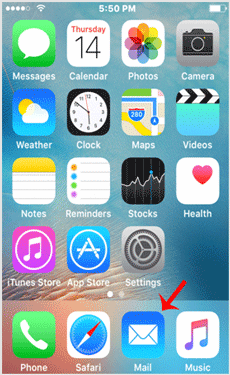
2. Select the "Other" Option.
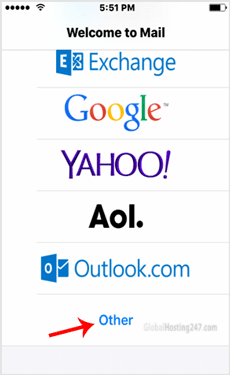
3. Tap on New Account and then under the "Imap" option. Enter an email, your full cPanel email address and a description such as Support Account, etc. Then press the "Next/Ok" button.
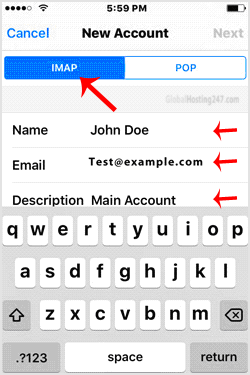
4. It can take a few minutes to verify the login details.
5. If the account is successfully added. Go to the Home Screen and click on Settings.
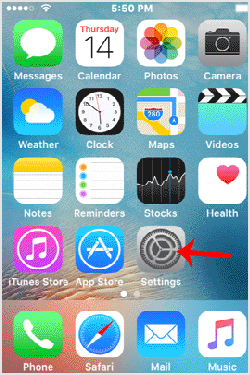
6. Scroll down and tap on Mail, Contacts, Calendars found under the setting option.
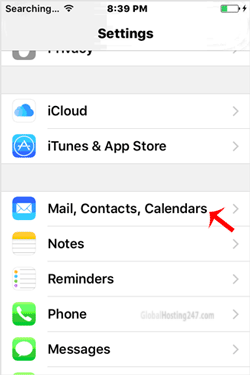
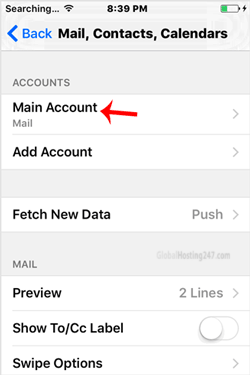
7. Under "Accounts", tap on the email account you created in step 3.
8. Under IMAP option, tap on your email address.
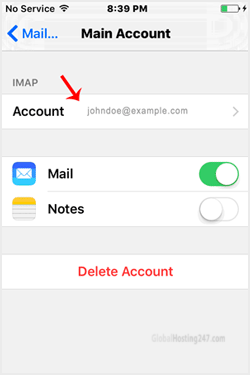
Note: Mail option should be turned on (Green) and Notes should be disabled.
9. Under "Incoming Mail Server", your info should be as follows:
Hostname:mail.domain name, such as mail.example.com where your domain is example.com
Username: Your full email address such as you@example.com
Password: Your email password.
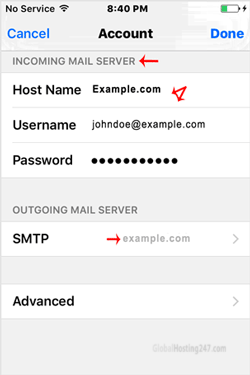
10. Now Tap on SMTP domain under the "Outgoing Mail Server option.
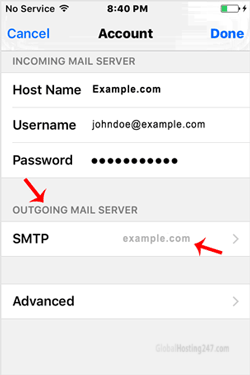
11. Make sure that the "Primary Server" status is "On.
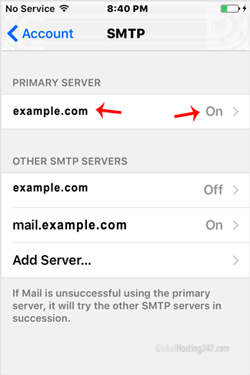
12. Outgoing Mail Server
Hostname: mail.domain name, such as mail.example.com where your domain is example.com
Username: Your full email address, such as you@example.com
Password: Your email password.
Use SSL: On
Authentication: Password.
Server Port: 465
(You can find more details in your cPanel for the configuration of your email >> Email >> Your Email >> Email Configuration)
Some Tips: If you have entered everything correctly and you get authentication error or does not work, you can login to the CPanel to try the mail Client Automatic Configuration Scripts.
- Home
-
Hosting
-
Service Banner 1
Services
Hosting is what makes your site visible on the web. We offer fast, reliable plans for every need - from a basic blog to high-powered site. Designer? Developer? We have got you covered too.
- Hosting
- Extra Addons
-
Service Banner 2

-
Service Banner 1
- Domains
-
Support
-
Our Support
- Knowledgebase
- Announcements
-
- Contact Us




 WGS AI Assistant